Welcome / Bienvenue / Benvinguts / Bienvenidos
For information about my translation services, please visit the main site.
Pour des informations sur mes services, merci de regarder le site principal.
Para información sobre mis servicios de traducción, visite el web principal.

Invalid French VAT numbers – how to correct them

On more than one occasion, I have had issues obtaining a valid intracommunity VAT number (numéro de TVA intracommunautaire) from French clients or service providers. The problems fall into two categories:

16-character or 14-character number instead of an 11-character number

Sometimes I have been given a 16-digit or 14-digit number instead of an 11-digit number. This is because the client or service provider is confusing their VAT number with their SIRET number.

The SIRET number is a 14-digit number consisting of a 9-digit SIREN number (e.g. 123 456 789, although the first two characters may be letters) followed by a five-digit NIC number, which usually starts with at least two zeros. An example SIRET number would be 123 456 789 00123.

French VAT numbers begin with the FR prefix, followed by a two-digit control number, followed by the 9-digit SIREN number. So, the company with the aforementioned SIRET and SIREN numbers might have the VAT number FR 12 123 456 789.

A 16-digit number is the result of the client or service provider adding the “FR ##” prefix to the 14-digit SIRET number, instead of to the 9-digit SIREN number.

So, if the client gives you a 16-digit number, such as FR 12 123 456 789 00123, simply drop the final five digits, and you have the intra-community VAT number (assuming the company has such a number – see below).

If the client gives you a 9-digit SIREN number, you can use an online tool to convert it to the corresponding VAT number.

But beware! The number you generate may only be a theoretical number, i.e. the number the client or service provider would be assigned if they applied for an intracommunity VAT number. But the client might not have applied. Before you can issue a VAT-free invoice under the reverse-charge mechanism you must check that they are registered in the VIES system.

See also Invalid Swedish VAT numbers – how to correct them.

Share:

Route du Rhum réussie pour Anglo Premier et Spindrift racing

Anglo Premier Translations collabore avec Spindrift racing depuis le mois de juin 2014. Le plus gros défi a eu lieu au mois de septembre. Ou plutôt “les” défis. Car si traverser l’Atlantique en solitaire dans un maxi-trimaran est un challenge de premier ordre, il l’est aussi être disponible 24 heures par jour pendant une semaine pour traduire toutes les dernières informations du français à l’anglais.

Pari réussi pour les deux! Car si Spindrift racing a fait une magnifique course, en terminant 2ème sur la Route du Rhum, Anglo Premier Translations, lui aussi, a été à la hauteur, avec la réactivité qui est nécessaire dans cette époque où tout le monde veut avoir un accès instantané aux dernières informations dans sa propre langue.

Pendant plus d’une semaine, Anglo Premier Translations a traduit toutes les informations – reportages et vidéos – publiées sur le site web de Spindrift racing. Au total, plus de 11.000 mots traduits dans des très courts délais au long des 8 jours de course.

Le bilan a été très positif. Virginie Bouchet, responsable de communication et presse de Spindrift racing, a tenu à remercier Timothy Barton, d’Anglo Premier Translations :

« Un grand merci pour votre travail, votre flexibilité et votre réactivité, qualités indispensables pour travailler dans le milieu de la voile, où l’on dépend que de la météo. Ça a été un super travail d’équipe et chaque individualité a contribué à cette réussite générale. Nous avons eu beaucoup de retombées médias et une belle exposition générale. »

Nous attendons avec hâte la prochaine course de Spindrift racing pour pouvoir répéter ce partenariat.

Share:

Services de traduction en Suisse

Anglo Premier Translations propose des devis et accepte des paiements en francs suisses pour que les clients en Suisse puissent bénéficier de tout son savoir-faire et de tout son professionnalisme.

Vous êtes dans la région de Genève ou de Lausanne et vous avez besoin de services de traduction? Je serai dans la région du 5 au 12 décembre pour présenter mes services à plusieurs entreprises et organisations. Si vous voulez aussi vous rencontrer avec moi pour que nous puissions analyser comment vous pouvez bénéficier de nos services de traduction, merci de nous contacter.

Je serai présent, notamment, à l’International Sports Convention (ISC) le 10 décembre, au Great British Breakfast avec Nick Varley organisé par la British-Swiss Chamber of Commerce le 11 décembre, et au Midi de la Chambre de la Chambre de commerce, d’industrie et des services de Genève le 11 décembre, mais je peux aussi prendre rendez-vous avez vous à tout autre moment.

Pour plus d’informations, merci de nous contacter.

Share:

Automatically move footnotes after punctuation, rather than before, in Word

Texts in Romance languages usually place footnote markers before punctuation. In English we place them after the punctuation. I usually change this on the fly while translating, but I’ve just received a text I outsourced because it was Italian-English and the translator hasn’t moved the footnote markers. No worries! There’s no need to go through the footnotes one by one, as a quick find-and-replace routine in Word will put the footnote markers in the right place (if you prefer, you’ll find a macro at the bottom of the page). Open up the find/replace box, select “Use wildcards”, and enter the following:

Find: (^2)([.,:;\?\!])
Replace: \2\1

It should be safe to use Replace All, but if you want to play safe you can click the Find button once and then keep clicking Replace.

Explanation:
^2 = Footnote reference (same as ^f without wildcards)
[ ] = Look for any character contained in the square brackets. The ? and ! are preceded by a backslash because they normally have special meanings. The backslash tells Word to ignore the special meaning and look for a literal ? or !.
\2 = Replace with the contents of the second parenthesis
\1 = Replace with the contents of the first parenthesis

If you wish to do the opposite conversion, to convert the English format to that used by the Romance languages, run the following procedure, also with wildcards:

Find: ([.,:;\?\!])(^2)
Replace: \2\1

If you have to perform either of these regularly you may want to create a macro. Here’s the code for converting to the English format:

Sub MoveFootnotesForEnglish()
'
' Macro by www.anglopremier.com (thanks to Simon Turner for converting to macro format)
' Moves footnote markers to after punctuation
Selection.Find.ClearFormatting
Selection.Find.Replacement.ClearFormatting
With Selection.Find
.Text = "(^2)([.,:;\?\!])"
.Replacement.Text = "\2\1"
.Forward = True
.Wrap = wdFindContinue
.Format = False
.MatchCase = False
.MatchWholeWord = False
.MatchAllWordForms = False
.MatchSoundsLike = False
.MatchWildcards = True
End With
Selection.Find.Execute Replace:=wdReplaceAll
End Sub

For those of you working from English to Romance languages, here’s the macro for you:

Sub MoveFootnotesFromEnglish()
'
' Macro by www.anglopremier.com (thanks to Simon Turner for converting to macro format)
' Moves footnote markers to before punctuation
Selection.Find.ClearFormatting
Selection.Find.Replacement.ClearFormatting
With Selection.Find
.Text = "([.,:;\?\!])(^2)"
.Replacement.Text = "\2\1"
.Forward = True
.Wrap = wdFindContinue
.Format = False
.MatchCase = False
.MatchWholeWord = False
.MatchAllWordForms = False
.MatchSoundsLike = False
.MatchWildcards = True
End With
Selection.Find.Execute Replace:=wdReplaceAll
End Sub

Share:

2014: a busy year

The blog has been quiet for a while; the last post was six months ago. It’s been a busy year so far for Anglo Premier Translations.

In January I translated (Spanish>English) an OECD report on e-learning and higher education in Latin America. The report looked in particular at how distance learning has evolved thanks to new technologies and how this is enabling the provision of higher education to isolated, rural parts of Latin America.

In February and March I was part of the translation and editing team for the OECD’s African Economic Outlook for the sixth consecutive year. For the 2014 edition, entitled Measuring the pulse of Africa, I translated the country reports for Comoros, Cameroon, Burundi and Algeria and proofread the translations done by other team members of the reports for Côte d’Ivoire, Mauritania, Togo, Guinea and Equatorial Guinea.

April was a somewhat quieter month, during which I was able to take a much-needed break, but I also began working with a new client, McCann Erickson, translating commercial material.

In May and June I began working with another University of Barcelona author. The professor is coordinating a book comparing the EU concept of services of general economic interest (SGEIs) and domestic legislation on public services in France, Spain and Italy. I translated chapters from French and Spanish to English and edited chapters translated from Italian to English.

At the end of May I had the pleasure of attending the International Conference on Economic, Business, Finance and Institutional Translation, held at the University of Alicante. The conference was of particular interest to me because I regularly provide economic translations to the OECD.

Also in June, I reached an agreement with the French sailing team SAS Spindrift to translate articles (French>English) related to their upcoming attempt at breaking the world record for the North Atlantic Crossing. My collaboration will involve being on stand-by 24 hours a day during the record attempt, as news items may come in at any time.

Finally, in July, after completing a test, I was accepted as a provider of translation services for the Inter-American Investment Corporation, and have already had the pleasure of working on two very interesting projects. I look forward to continuing our business relationship.

Anglo Premier Translations will continue operating throughout August, when I expect to receive academic papers from university lecturers taking advantage of the end of their semester to finish off articles. And in September and October I will be providing translation and revision services (Spanish>English) for Latin American Economic Outlook for the third consecutive year. Finally, in November I will attend the Mediterranean Editors and Translators conference for the eighth consecutive year.

Share:

Bookmarklet tweaks

I’ve corrected some of the bookmarklets I made available on my main website. All the bookmarklets now lead to the correct site, and the Oxford English Dictionary one now works with all words. There is also a link to a site explaining how to disable speed dial in Firefox, since the bookmarklets don’t work if you are on the speed dial page.

Share:

AHK scripts to change status in MemoQ

These Autohotkey scripts allow MemoQ users to switch between the Confirmed, Reviewed and Proofread user statuses using the keyboard. The shortcuts are shift-ctrl-z, shift-ctrl-x and shift-ctrl-c. Users of keyboards that don’t have the z, x and c next to each other may wish to change the shortcuts in the code.

; Set "Confirmed"
SetTitleMatchMode, 2
#IfWinActive, memoQ
+^z::
setkeydelay, 20
send, !v{down 6}

sleep 100
send {Enter}
sleep 100
send, +{TAB 6}
send, c

;return to document
send +^{tab}
sleep 100
return

; Set "Reviewer"
SetTitleMatchMode, 2
#IfWinActive, memoQ
+^x::

;from Translations pane
setkeydelay, 10
send, !v{down 6}

sleep 100
send {Enter}
sleep 100
send, +{TAB 6}
send, r

;return to document
send +^{tab}
sleep 100
return

; Set "Proofreader"
SetTitleMatchMode, 2
#IfWinActive, memoQ
+^c::

;from Translations pane
setkeydelay, 10
send, !v{down 6}

sleep 100
send {Enter}
sleep 100
send, +{TAB 6}
send, p

;return to document
send +^{tab}
sleep 100
return

Share:

Website testing

When translating a website one important aspect translators should include in their budget is website testing. It is the equivalent of reading the proofs of a book before it goes to print. In the publishing industry, translators can spot errors introduced by typesetters who are unfamiliar with conventions in a certain language, such as decimal commas in French, Spanish and other languages vs. decimal points in English.

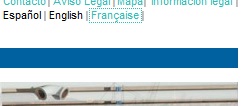
On a website, clients often overlook menu items when sending website content to the translator for translation. Since the menu items are seemingly simple words, web designers and webmasters may decide to translate the items themselves. Unfortunately things can go wrong, as exemplified below in a screenshot from a website that, otherwise, has a good French translation.

française

The French word for “French” is “français”, not “française”. The latter is the feminine form of the adjective, as in “une entreprise française” (a French company). When used as a noun to refer to the language it should always be spelt “français”, pronounced with a silent s.

Similar mistakes often encountered on websites, but also on hotels and signposts, include “wellcome” instead of “welcome” and “bienvenu” or “bienvenus” instead of “bienvenue”. In Spanish the word “bienvenido” when used as exclamation agrees with the gender and number of the people being addressed, but in French the exclamation is invariable.

However tempting it may be to translate small words yourself, always check with a professional translator to avoid embarrassing mistakes that spoil your company’s image.

Try to work with a translator who is experienced in translating and localising websites. A good website translator can save you time and money by working with the source code, rather than in a Word document that you then have to reconvert to the format of your website, and will thus ensure that all the menu items and headers and footers are also correctly translated. I would recommend arranging a meeting between the person responsible for the web content, the web designer and the translator to discuss the best strategy.

Share:

Research articles

One of the areas in which Anglo Premier Translations has specialised is in research articles for academic staff. My translation and editing services have resulted in nine academic papers being published in journals and four conference papers or working papers. This is in addition to books I have published with academic articles in them. For more information, including links to the articles, see the new Research articles page of my website.

Share:

Nou joc en línia en llengua catalana

Al lloc web Apterous ja es pot jugar en llengua catalana. És un joc en què cal formar la paraula més llarga possible a partir d’una sèrie de lletres. També té unes rondes que són joc de xifres. Es pot jugar gratuïtament o pagant una subscripció de 20 lliures (uns 25 euros) per a tenir més opcions de joc. L’interfície està en anglès, però un cop que hagueu creat un compte d’usuari podeu jugar partits en català.

Apterous va ser creat per un fan del programa de televisió britànic Countdown. Aquest concurs va ser el primer programa que va aparèixer al canal britànic Channel 4 l’any 1982, i encara continua avui dia amb el mateix èxit que sempre.

El programa britànic va ser inspirat per la versió francesa Des chiffres et des lettres, a partir del qual també es va crear la versió espanyola Cifras y letras. El programa mai no s’ha emès en català, però ara es pot jugar en línia.

Ronda de lletres

Ronda de lletres. També es podia jugar DEDICAT, amb 7 punts.

Es tracta d’una sèrie de rondes de xifres i de lletres. En les rondes de lletres, cal crear el mot més llarg a partir de les lletres triades. En les rondes de xifres, cal arribar a un nombre objectiu sumant, restant, multiplicant i dividint diverses xifres més petites. La versió britànica no inclou la ronda anomenada “Le duel” en francès i “El duelo” en castellà, així que no està inclosa a Apterous.

Vaig començar a jugar al web fa uns mesos, sobretot per l’interès que em va despertar el fet que un amic meu, Ross Lander, apareixia al programa. A Apterous ja es podia jugar en 13 llengües diferents a més de l’anglès (alemany, eslovac, espanyol, finès, francès, gal·lès, grec, hebreu, italià, llatí, neerlandès, portuguès i rus), però no s’hi podia jugar en català. Sabia que hi havia una llista de mots catalans en format obert que es feia servir per al joc Scrabble, així que vaig proposar al creador del web afegir la llengua catalana i ho va fer.

La llista que hem fet servir inclou les formes valencianes i balears de les paraules.

A la versió catalana hem hagut de prendre decisions sobre què hem de fer amb les lletres “especials” del català. Vam prendre les decisions següents:

  • Vocals accentuats: Com a altres jocs de formar mots, els accents s’ignoren. Per tant, no es distingeix entre deu i déu.
  • Ç: És una lletra a part, per tant no es pot escriure la paraula tenaç amb una c normal.
  • l·l: Per escriure un mot amb ela geminada cal tenir dues eles entre la selecció. A l’hora de declarar el mot, no cal posar el punt suspès entre les dues eles però es pot fer. Per tant, a efectes d’aquest joc, si tenim les lletres C, E, L, L, i A podem escriure tant cella com cel·la.
  • NY: Al contrari del Scrabble, no hi ha cap rajola NY. Per a escriure mot amb la grafia NY, cal tenir tant un N com una Y. Si s’hagués inclòs una rajola NY, la paraula banyar s’hauria comptat com un mot de cinc lletres en comptes de sis, i per això preferíem no tenir una rajola NY.
  • QU: Pel mateix motiu que amb la NY, al contrari que al Scrabble en català, la Q no es pot emprar com a QU.
  • K i W: Com que només existeixen en un grapat de mots importats i no adaptats, no s’inclouen en la versió catalana del joc

A l’hora que publico aquest article, encara no hi ha jugadors nadius de català que juguen a Apterous. Però no us preocupeu! Hi ha jugadors tan bons que aconsegueixen fer bons resultats en llengües que no parlen, només aprenent una mica sobre les estructures de les llengües. De fet, en el format de 15 rondes lletres (sense rondes de xifres), al qual he jugat diverses vegades, només tinc el 5è millor resultat amb 108, lluny darrere d’Adam Gillard (un dels millors concursants que ha aparegut a Countdown), que en té 151.

Per entendre com Adam Gillard ha anat aprenent l’estructura del català és curiós mirar la seva llista de mots no acceptats que ha jugat en aquesta llengua. Veiem com ha anant provant paraules per a aprendre la morfologia de la llengua.

D’aquesta manera, podeu preguntar en el xat si algú vol jugar en català. Els usuaris amb subscripció també poden entrenar jugant contra el bots, que són els que tenen un nom que comença amb la paraula “Apterous”.

Així que què espereu? Apunteu-vos-hi. Que tingueu sort. I doneu-me el vostre nom d’usuari perquè pugui podem jugar alguna partideta.

Un cop registrat, per a jugar en català, un cop dins la sala cal anar a “Challenge in a custom format”, “Non-English”, i “Catalan”. Després hi ha quatre opcions:

  • Catalan 15: La versió clàssica. Partit estàndard que té 15 rondes, 10 de lletres, 4 de xifres, i un “Conundrum” (cal trobar el mot de 9 lletres).
  • Catalan 9: Una versió més curta de l’anterior, amb només 9 rondes (6 lletres, 2 de xifres i un “Conundrum”.
  • Catalan letters: Només rondes normals de lletres.
  • Catalan conundrums: Només “conundrums”.
Share: